
For the person taking medicines
This is the DrBell app on a phone. It has one job: to tell you what to take now, and to record that you took it.
The picture of the app below is from an Android emulator running the current build, because the app is not in the stores yet. Your phone may draw it slightly differently; the words and buttons are the same.
Signing in
Your mobile number. The same button creates your account — there is no separate sign-up, no password to remember and no email needed.
You are sent a six-digit code. Type it in and you are in.
If you would rather use Google or Apple, those buttons are on the same screen when DrBell has them switched on. Your number always works.
If you add an email address later, under Your account, that becomes a second way in — never a replacement. Your number always works.
The main screen
One card, filling the screen, for the dose that is due now.
It shows:
- the name of the medicine, as printed on the packet
- how much to take
- whether it is before food, with food, after food, or on an empty stomach
- a photograph of the actual strip, if one was taken when the medicine
was added (see Photograph the strip below), so you can check what is in your hand against what is on the screen
Two buttons, and only two:
- Taken — records it. It is confirmed instantly, on the phone, whether or
not there is signal. It syncs later.
- Snooze — remind me again shortly.
There is a Read aloud button underneath. It reads the card in your own language.
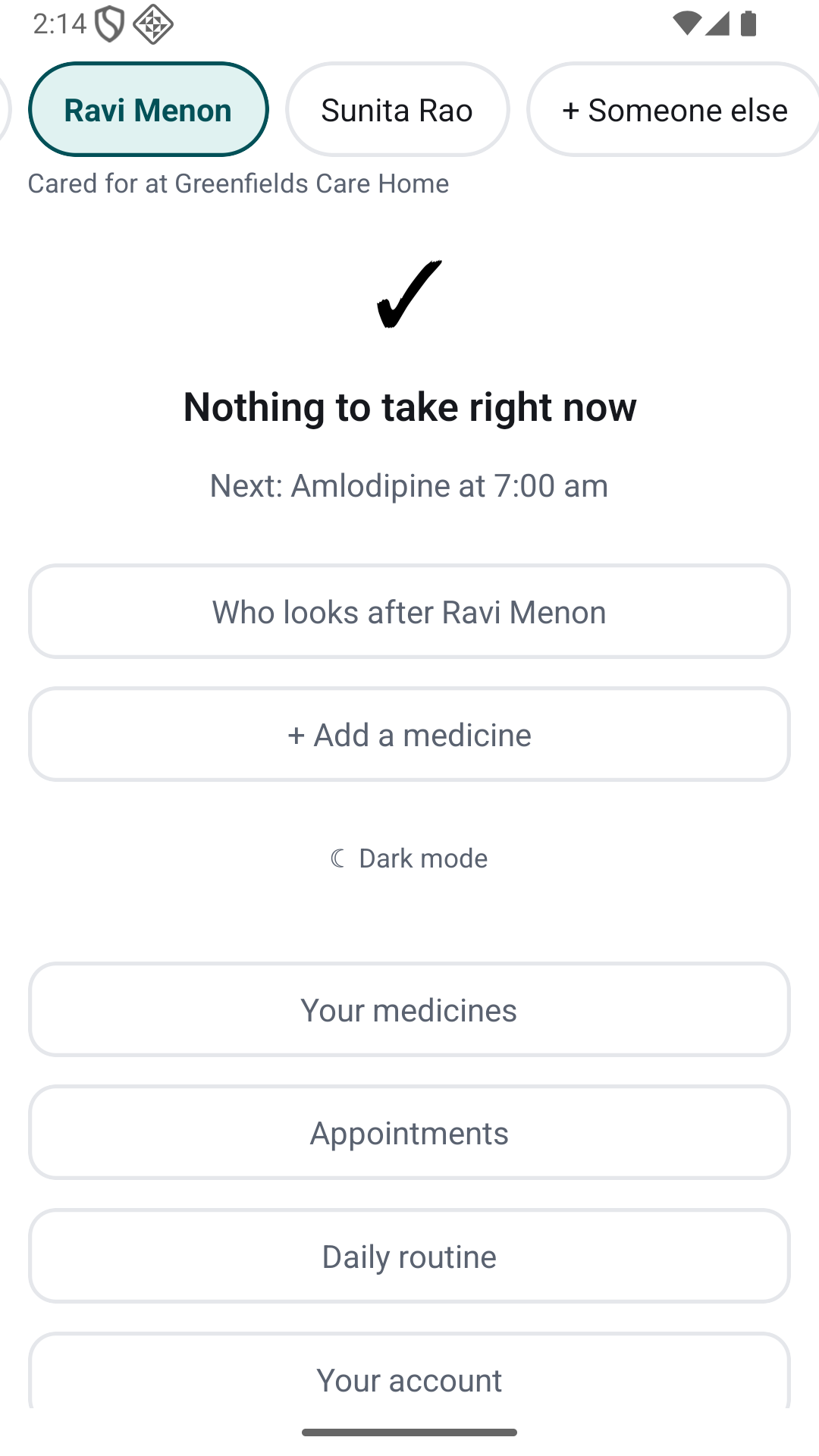
When nothing is due, the screen says so and tells you when the next one is.
If you look after more than one person, their names are in a row across the top; tap one to switch. For somebody living in a care home, the home's logo and "Cared for at …" appear under the names (not in elder mode, which keeps the screen to the card). That is deliberate: "nothing to do right now" is an answer, and it should not look like an empty list.
If you miss one
After the window to take it closes, the dose is recorded as missed and the people who look after you are told. For a medicine marked critical, they are told straight away without waiting.
Snoozing the same dose over and over also tells them. That is not a punishment — it is usually the sign that something is actually wrong.
Adding a medicine
+ Add a medicine. Type the name exactly as printed on the packet, whichever script that is, and the shorthand from the prescription — 1-0-1, BD, TDS, SOS, Q6H, A/F, x 7d.
DrBell shows you what it understood, in a sentence. Read that sentence against the prescription before you save it. It will not save until you have.
Photograph the strip
Under Photo of the strip, Take a photo opens the camera. Choose one picks a picture you already have.
Photograph the strip the way it looks in the drawer, because that is exactly what you will see when the reminder goes off. It is the difference between "Metformin 500" and the thing in your hand.
You can skip it. The medicine saves perfectly well without a picture, and you can add one later.
The photo is kept on this phone as well as on our servers, so the reminder still shows it when you have no signal. Signing out deletes the copies on the phone.
The first time you add a medicine, you are asked to read two short notices first — what DrBell is, and what happens to your data. That is the only thing they gate. Reading a dose is never blocked by them.
Your medicines
Your medicines lists everything DrBell is reminding you about, with the photo of each strip and the dosing shorthand exactly as the doctor wrote it.
- Add a photo / Change photo — for a strip that was not in the room when
you added the medicine.
- How many are left? — tap and type how many are in the box, or
Add a new strip. DrBell says how long that lasts, and warns you five days before it runs out. Every dose you take counts down by itself.
- How long — under each medicine it says Until its last day, or *No
end date*. When the doctor changes how long to take it — "three more days", "stop after Friday", "carry on for now" — press The doctor changed how long, move the last day earlier or later (the last day is included, and cannot be before today), or choose No end date, and Save. Reminders after the new last day disappear, or new ones appear; what you have already recorded is kept. Only change it when the doctor has told you to.
- Stop taking this — ends a medicine's reminders on this phone and for
your caregivers straight away. What you have already recorded is kept. Only stop a medicine when your doctor has told you to.
A course "for 7 days" reminds you for exactly seven days, today included.
To change when a medicine is taken, stop it and add it again with the new instructions. DrBell shows the new times back for you to check, the same way it did the first time. Times are never changed from the list, one tap away from a mistake.
Who looks after you
Who looks after [name] lists the people who can see your record, and lets you invite more or remove them.
Anyone you invite can see what you have taken and, as a caregiver, be told when you have not. A Guardian can also add, stop and count your medicines and change how long a course runs; a Caregiver or Viewer cannot. Nobody can change a dose or its time from the list.
If you set this record up for someone else, you are told when they miss a dose — you do not need to invite yourself.
Every time someone reads your record, it is logged.
Setting up
The first time you sign in, DrBell asks who it is for.
- Me — you take the medicines, and the reminders come to this phone.
- Someone I look after — a parent, a child, anyone. You can invite them,
and other family, afterwards.
Then a name, the language their reminders should speak, how the screen should look, and their meal times. Meal times matter more than they look: every dose written 1-0-1 or "after food" is timed from them, so set them to when the person actually eats.
Looking after more than one person
If you look after several people, their names run along the top of the screen. Tap one to see their doses; the phone remembers who you were looking at. + Someone else adds another person the same way as setting up.
Appointments
Appointments holds doctor's visits, tests and procedures. Add an appointment: what it is, when (the date starts at tomorrow; − 1 day, + 1 day, − 1 week, + 1 week move it, and a time is optional), and if you like the doctor and the hospital or clinic.
DrBell reminds you the day before and on the morning itself. Went marks it done once the day comes; Cancel it stops its reminders and keeps it in the history as cancelled.
Daily routine
Daily routine holds the things every reminder is timed from:
- Meal times —
−and+move each by fifteen minutes. Saving moves
every reminder that follows a meal, on this phone straight away. Times out of the usual order are allowed (a night shift eats breakfast in the evening), and DrBell checks with you first.
- How the screen looks — Large and simple (very large text, one
medicine at a time, two big buttons), Standard, or For a child (stickers, and a grown-up confirms each dose).
- Language — for reminders and read-aloud. Medicine names always stay as
the doctor wrote them.
- Time zone — if the phone is in a different zone from the one the doses
follow (somebody who has moved), one tap moves every future reminder.
- Download a copy — everything about this one person, as a file for a
new doctor or another app.
- Erase [name] — only for someone you added. It erases their medicines,
history, photographs and caregivers straight away and for good, so you type their name to confirm. Download a copy first if you may need it.
- For the doctor — Send a link opens your phone's share sheet with a
link to the last 90 days of medicines and doses. The doctor opens it in any browser, with no account; it stops working after 14 days, and Stop it ends it sooner. Sending one needs the Plus plan, which cannot be bought yet — until it can, the button says so.
- Their own phone — whether the record is on the person's own phone. How
the screen looks only changes their phone: when you look after your mother, choosing Large and simple for her makes her phone large and simple, not yours.
A caregiver who has only been invited to watch sees all of this but cannot change it.
Putting someone on their own phone
If you set somebody up and they have a phone of their own, go to Who looks after them, enter their number, and choose Their own phone. When they sign in with that number and accept, the record is theirs on that phone: the reminders come to them, their "Taken" is their own, and the screen is the one chosen for them. It does not use up a caregiver place on your plan. If the phone later changes hands, Unlink their phone in Daily routine and invite the new number.
Your account
At the bottom of the main screen: Your account.
- Your name. What your caregivers see when you record a dose.
- Your mobile number. Shown, and not changeable — it is how DrBell knows
you. Ask us if it has to change; your medicines and history come with you.
- Email. Optional, and only ever a second way to sign in if you lose
your phone. Your mobile number stays the main one. We send a six-digit code to the address; type it back in.
- Language. See below.
- Time zone. Shown, not changeable here. It is used for the times you
read. It does not move anybody's dose — a dose time belongs to the person taking it, and lives on their record.
- Download a copy. Everything DrBell holds about you and the people you
look after, as a file. Your phone's usual share sheet opens so you can keep it or send it on.
- Sign out everywhere else. This phone stays signed in; every other phone,
tablet and computer is signed out and reminders stop on them.
- Delete your account. Your reminders stop and everything is erased after
30 days — medicines, history, photographs, and the people you added. You type your own number to confirm, you are told by name whose records go with it, and you can change your mind any time in those 30 days.
Light and dark
At the bottom: ☾ Dark mode.
The app is light by default on every phone, even one set to dark. That is on purpose. Bright text on a dark background scatters in an eye with cataracts, and the letters bloom into each other. If you prefer dark, one tap, and it is remembered on this phone — it does not change anybody else's.
For children
If the screen is set to Kid, a grown-up confirms each dose after the child taps Taken, and the child collects stickers.
Stickers are never taken away. A reward you can lose is a reason to tap "Taken" for a tablet that went in the bin.
Your language
Everything DrBell says — the buttons, the reminders, the read-aloud — is in the language you chose.
Change it under Your account → Language. Nine languages, and the choice takes effect immediately.
The name of a medicine is never translated. Not in the app, not in a notification, not read aloud. A translated medicine name may name something that does not exist, or something else entirely, and the packet in your hand is in the original script anyway.
What DrBell will never do
It will never suggest a medicine. It will never suggest a dose. It will never tell you to change either, or tell you a medicine is wrong for you.
It reminds you of what your doctor already decided. If you think something is wrong, that is a conversation with your doctor.