
Android and iPhone — how reminders ring
A DrBell reminder is meant to be hard to miss. Android and iPhone allow apps different things, so the same reminder looks different on the two kinds of phone. Both ring at the right time, even with no internet. What changes is what you see and where you press Taken.
| Android | iPhone | |
|---|---|---|
| What appears | DrBell fills the screen, even when the phone is locked | Apple's own alarm screen, like the Clock app's |
| Photo of the strip | Yes, on the alarm | Not on the alarm (Apple does not allow it). It is on the dose DrBell opens next |
| Buttons on the alarm | Taken, Later 5 / 10 / 15 min, Silence | Later, and slide to stop |
| Where you press Taken | On the alarm | In DrBell, which opens on that dose after you slide to stop |
| Sound | DrBell's own alarm sound | Apple's standard alarm sound |
| Silent mode / Do Not Disturb | Rings through them once you allow it | Rings through silent mode and Focus |
| If nobody answers | Rings for up to 3 minutes, then again 10 and 20 minutes after the time | The iPhone stops after about a minute and a half and rings again later; DrBell also rings again 10 and 20 minutes after the time |
On Android
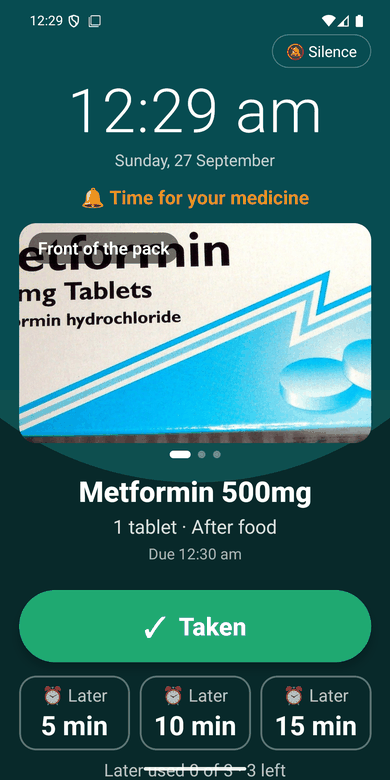
When it is time, DrBell takes over the screen, even if the phone is locked and in a pocket. You see:
- the time, and Time for your medicine;
- the photograph of the strip you took when you added the medicine (swipe
to see the back of the strip and the dose itself, if you photographed those too);
- the medicine's name, how much to take, and whether to take it with food;
- a big green Taken button;
- Later buttons: 5, 10 or 15 minutes. You can put a dose off three times
(an important medicine: 5 minutes at a time, and your caregiver is told each time);
- Silence, top right, which stops the sound but keeps the screen, so you
can find your tablets in peace.
Press Taken and it is recorded, on the spot, without unlocking the phone and without signal. Your caregivers see it when the phone is next online.
If nobody answers, the alarm rings for up to three minutes, then again ten minutes after the time and again at twenty minutes. Later the people who look after you are told.
On an Android tablet or a foldable, DrBell and its alarm turn with the screen, upright or on its side. On a phone they stay upright.
On iPhone
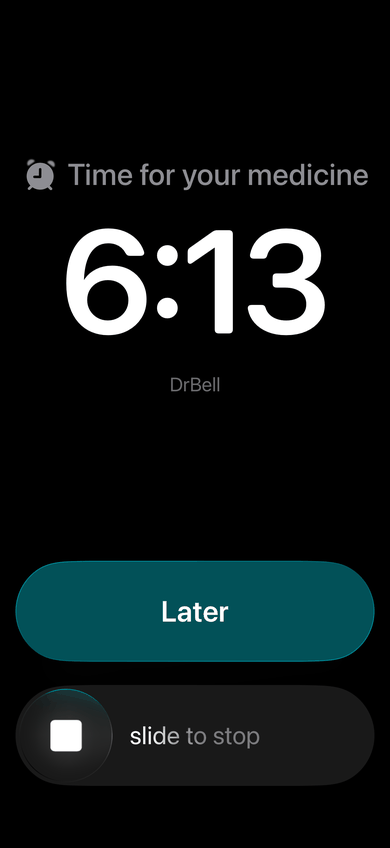
On an iPhone with iOS 26 or later, DrBell uses Apple's alarm, the same kind of alarm as the Clock app. It sounds even when the Ring/Silent switch is on Silent and when a Focus is on, and it fills the Lock Screen.
Apple decides what that screen looks like. It says Time for your medicine, the time, and DrBell, with two controls:
- Later: the alarm stops and rings again in 5 minutes.
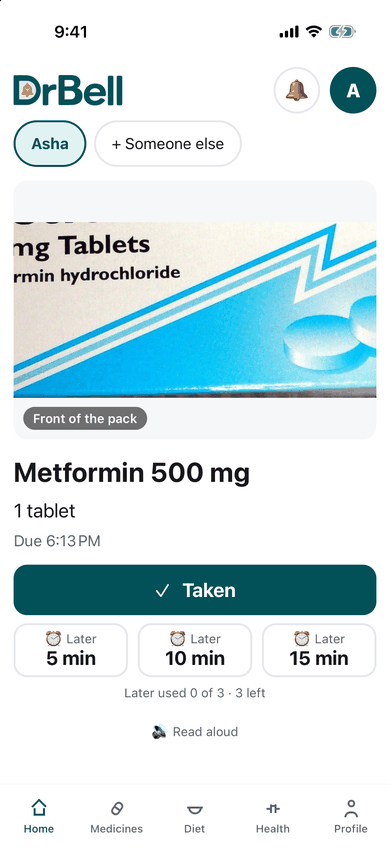
- slide to stop: the alarm stops. **Unlock the phone and DrBell opens on
that dose, with the photograph of the strip and the Taken** button.
Apple allows only one button besides stop, so there is no Taken button on the iPhone alarm. Sliding to stop does not record the dose. Press Taken in DrBell:
The reminder also stays on the Lock Screen as a notification. Tap it to open the dose; press and hold it for Taken and Later without opening the app.
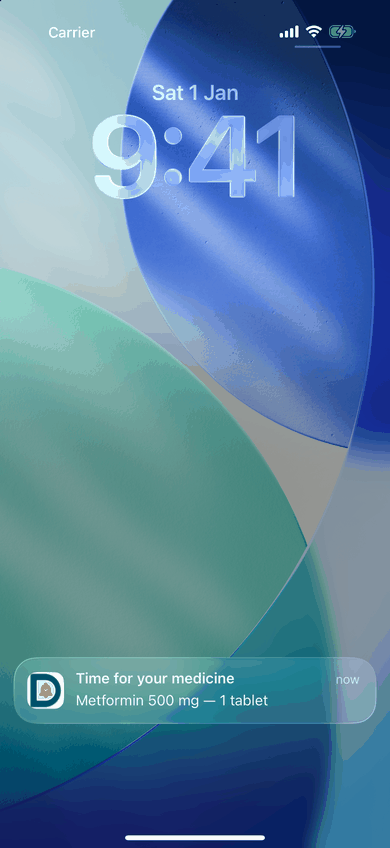
The sound is Apple's standard alarm tone, not DrBell's own. When DrBell used its own sound, iPhones scheduled the alarm and then failed to show it. Apple's sound always shows.
If nobody answers, the iPhone stops the alarm itself after about a minute and a half and rings again a few minutes later, as it does for any alarm. DrBell also rings again ten and twenty minutes after the time. If the dose is still not marked taken, the people who look after you are told.
On an older iPhone (before iOS 26), or if you said no to alarms, the reminder comes as a notification with DrBell's sound instead. That notification does obey the Ring/Silent switch, so keep it on Ring around dose times. On an iPhone before iOS 26, DrBell says so where it sets up reminders and under Profile → Reminders on this phone: "This iPhone shows reminders as notifications. On iOS 26 or later, DrBell rings like an alarm clock, even in silent mode." Nothing needs fixing; updating the iPhone to iOS 26, if it can take it, brings the alarm.
What to allow
DrBell asks for these when you set it up, on a screen called Make sure reminders reach you. Each takes a few seconds. You can come back to them any time: DrBell checks them whenever it opens and shows a Needs you card on the main screen when one is off.
Android
- Allow notifications.
- Allow exact alarms (Settings calls it Alarms & reminders). Without
it a reminder can arrive late.
- Show the alarm over the lock screen (Android 14 and later: *Full screen
notifications*). Without it the reminder still rings, but as a banner instead of filling the screen.
- Let DrBell run in the background: battery not optimised, or
Unrestricted. This is the commonest reason a reminder does not ring.
- Reminder sound on. In DrBell's notification settings, the reminder
channel must be Alerting, not Silent. The phone's own silent mode does not stop DrBell; this setting does.
- Auto-start, on Xiaomi, Redmi, Poco, Oppo, Realme, Vivo, Samsung,
Huawei and Honor phones. DrBell shows the steps for your phone and opens the right screen.
DrBell will not open its main screen on Android until every step except 3 is done, because without them it cannot ring. Step 3 only changes how the reminder looks.
iPhone
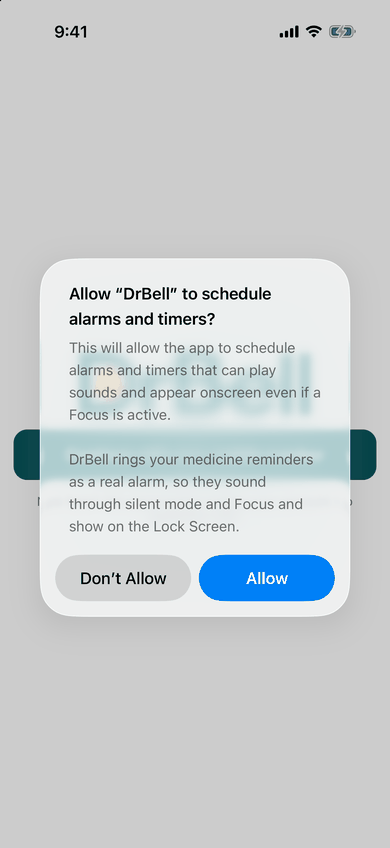
- Allow notifications, and leave Time Sensitive Notifications on.
- Allow DrBell to schedule alarms and timers. This is what lets the
reminder ring through silent mode and Focus. iPhone asks once, when DrBell first opens.
- Sounds on for DrBell's notifications.
- Lock Screen ticked under DrBell's notification alerts.
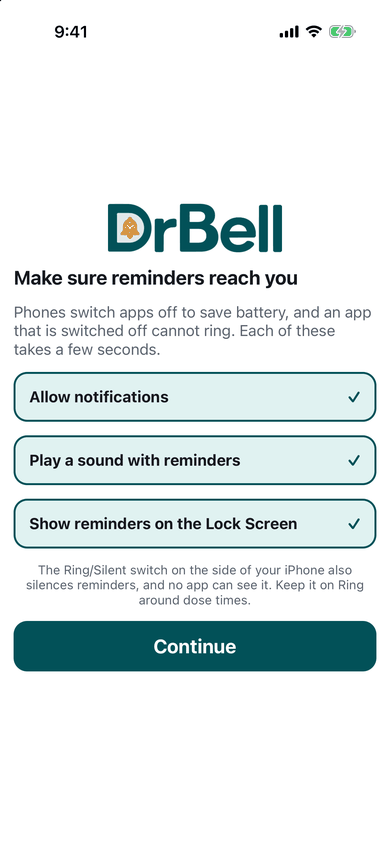
No app can see the iPhone's Ring/Silent switch. Apple's alarm rings through it; a plain notification does not.
If a reminder did not ring
Open DrBell first. If something is switched off, the main screen says so in a Needs you card, and tapping it takes you to the setting.
On Android, check in this order:
- Settings → Apps → DrBell → Notifications: allowed, and the reminder
channel set to Alerting with sound on.
- Settings → Apps → DrBell → Alarms & reminders: allowed.
- Settings → Apps → DrBell → Battery: Unrestricted (or "not
optimised").
- On Xiaomi, Oppo, Vivo, Realme, Samsung, Huawei and Honor: auto-start
on, as DrBell showed you.
- Alarm volume up, and Do Not Disturb allowing alarms.
On iPhone:
- Settings → Notifications → DrBell: Allow Notifications on, *Time
Sensitive on, Sounds on, Lock Screen* ticked.
- Settings → Apps → DrBell: Alarms allowed. If you said Don't Allow
when asked, turn it on here.
- On an older iPhone, the Ring/Silent switch on Ring.
On both: the phone must be switched on and DrBell must not have been signed out. Signing out stops reminders on that phone until you sign in again.
If the phone cannot ring for half an hour, or has not been in touch for a day, DrBell tells you and the people who are told about your missed doses (in the daytime), and tells them again when it is fixed.
Still stuck? See the person taking medicines, or contact us.